The questions we hear most.
Straight answers on turning Hovr on, where the video comes from, what you control, and cost — written for properties already running on GuestCentric.
Getting started
What is Hovr?+
Hovr is a video layer for your booking experience. It builds a library of short-form video for your property, places it on the pages guests browse, and reports on the bookings that video influenced — all from one dashboard inside your GuestCentric booking engine.
How is Hovr added to the GuestCentric booking engine?+
Hovr automatically pulls room images from the booking engine and creates an interactive image reel for each room type. Animated Highlights are placed over each room type title to showcase visual content, using the brand’s hex color for a seamless aesthetic. If your booking engine supports multiple languages, Hovr applies to those versions automatically. If you have video room tours available, these can be used in place of the image reel. You will be driving higher conversion rates in no time.
Why is Hovr needed for the booking engine?+
Hovr helps guests visualize their stay at the most critical moment — when they’re deciding to book.
- Increased engagement
- More confident booking decisions
- Higher conversion rates
How long does it take to go live?+
Same day. Simply turn the toggle "on" and you'll be live with videos made from your existing images. To upload your own content, check out How can I substitute a video room tour for the existing Image Reel?.
Using the Video Manager
How can I edit an Image Reel?+
Walk through editing an image reel inside the Video Manager.
How can I reorder the images in an Image Reel?+
Drag images into the order you want inside the Video Manager.
How can I generate an Image Reel with AI to enhance animation?+
Use AI enhancement to add richer motion to an existing image reel.
How can I substitute a video room tour for the existing Image Reel?+
Upload a room tour video and it replaces the auto-generated image reel for that room type.
How can I hide Hovr videos for a client?+
Hiding videos for a client’s booking engine is a simple function within the Video Manager. At the top of the screen you will see a green toggle labeled “Live”. Click it to switch to “Draft”. The client’s videos are hidden until they decide to turn them back live.

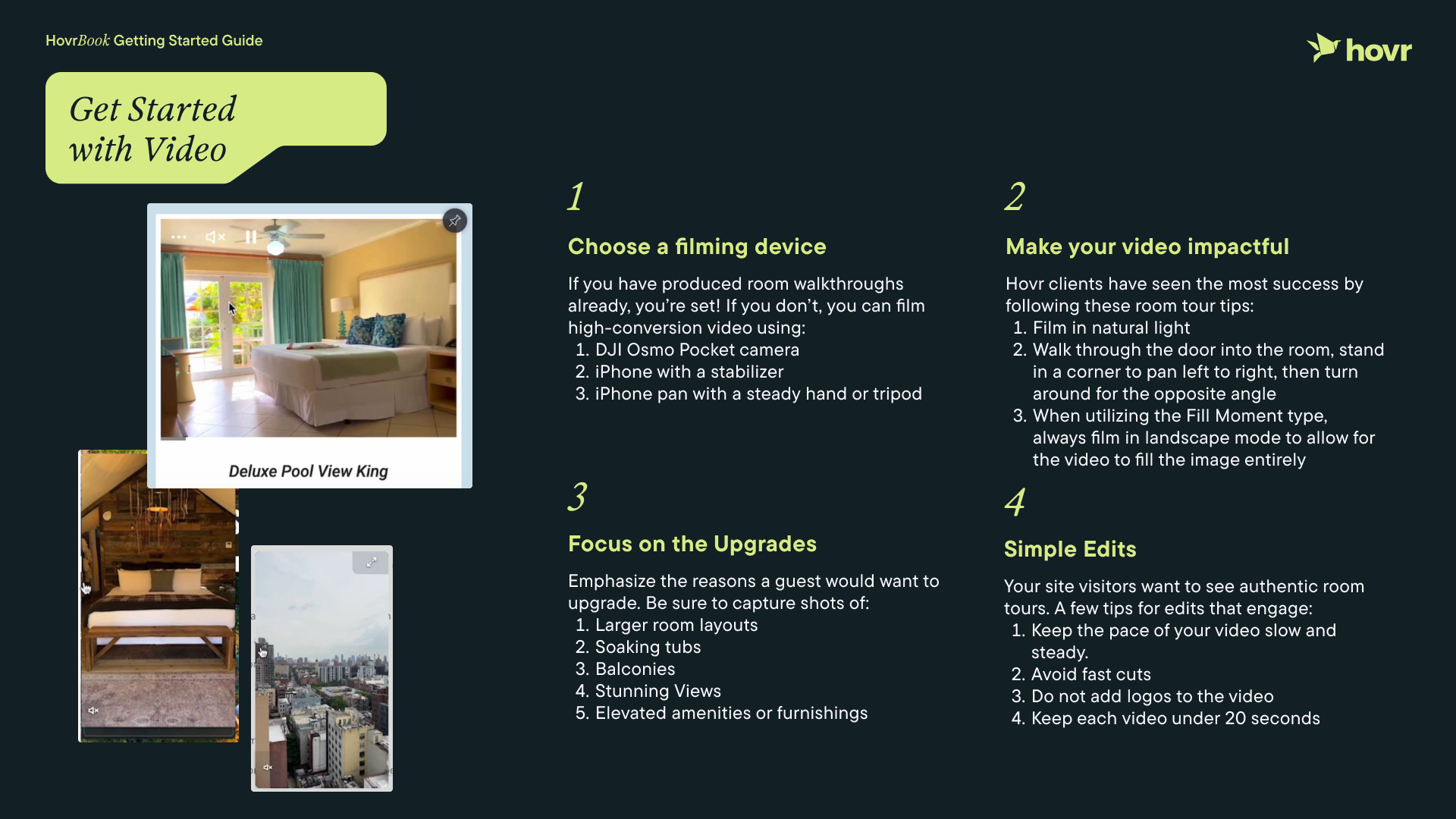
What are the top tips for a client filming new room tour videos?+
Share this quick-start guide with the property before they film.
Video specs
What are the ideal video dimensions for Hovr?+
Vertical (9:16), 1080p resolution recommended.
What is the recommended video length for Hovr?+
10–30 seconds is ideal to keep room tour content engaging and easy to consume.
Integration & technical
Does it work on mobile?+
It's built mobile-first. Most guest browsing happens on a phone and Hovr is designed to enhance that experience.
Performance & reporting
What type of Performance Metrics does Hovr provide and how can I access them?+
Monthly metrics are available in the Video Manager dashboard’s “Performance” section.
- Impressions
- Engagement
- Watch time
- Conversion Rate
- Influenced Revenue
Commercial & support
Can a client add Hovr to their brand website as well?+
Yes. Hovr can be implemented across both the brand website and booking engine for a consistent experience. If your client would like information on setting up Hovr for their marketing website, reach out to marcy@gethovr.com to introduce us.
How can I contact Hovr for a question or need?+
The GuestCentric team can contact Hovr at any time by emailing support@gethovr.com. This creates a ticket, and our team responds within one business day.
Still have a question?
Ask your GuestCentric rep, or reach out straight to the Hovr team for additional support.
Ask the Hovr team →